USER GUIDE
MASTER THE ARCHITECTURE OF THOUGHTOptimized for Antigravity
While this extension is fully compatible with VS Code, it is designed to unlock its full potential when paired with Antigravity's advanced agentic capabilities. To experience the true power of AI-assisted thinking workflows, we strongly recommend using the Antigravity environment.
Download AntigravityHow to Install "GoT Ideas Extension" on Antigravity.
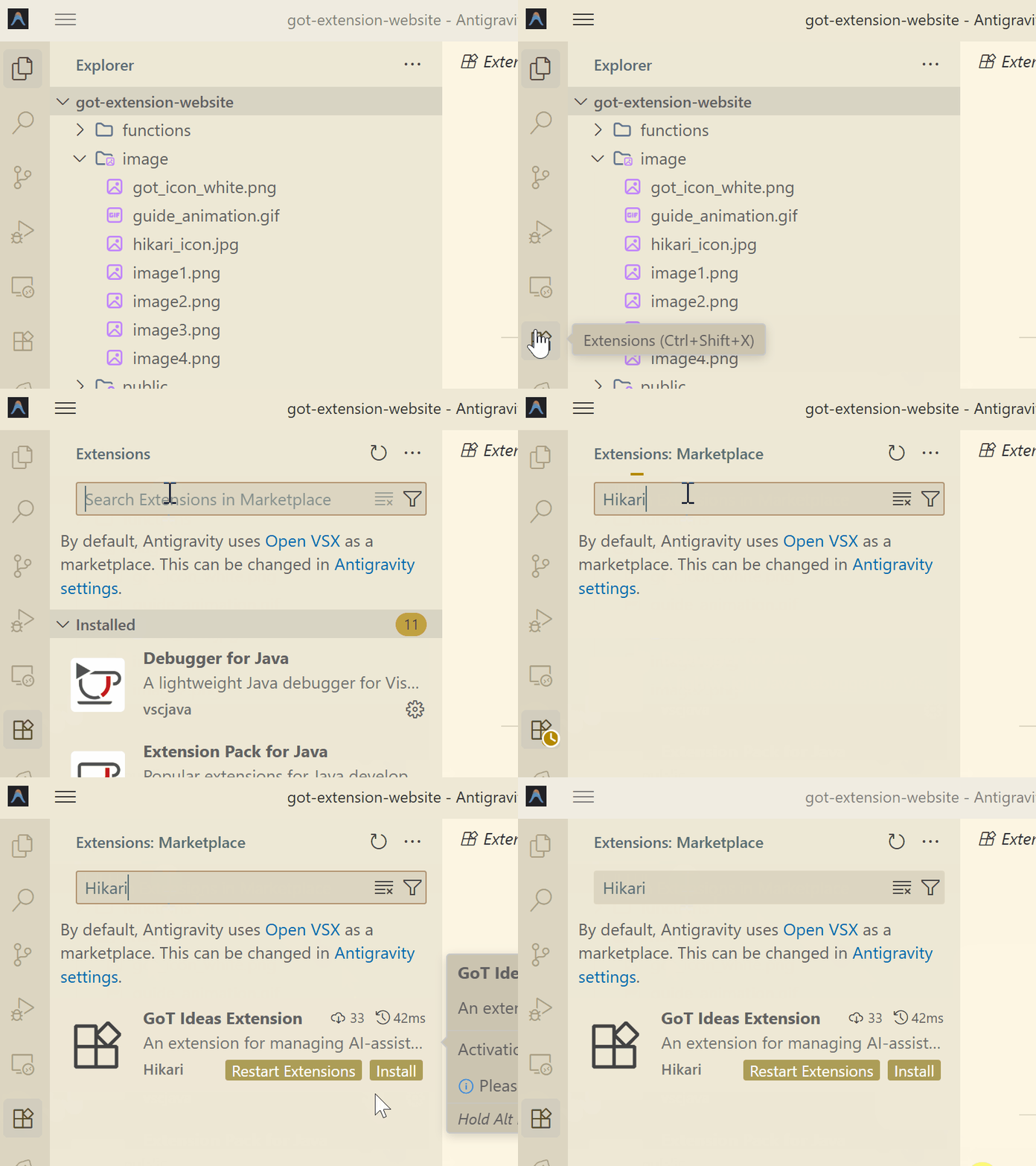
1. Click the Extensions button in the sidebar.2. Type GoT Ideas Extension in the search bar.
3. Click Install.
How To Install
Unlock the full potential of AI-assisted thinking by installing the extension directly within Antigravity.
Search for Hikari in Antigravity's Extensions.
Overview
An advanced extension for managing AI-assisted thinking workflows using the Graph of Thoughts (GoT) methodology. This tool helps you organize, visualize, and evolve your ideas using a structured YAML-based system.
Key Features
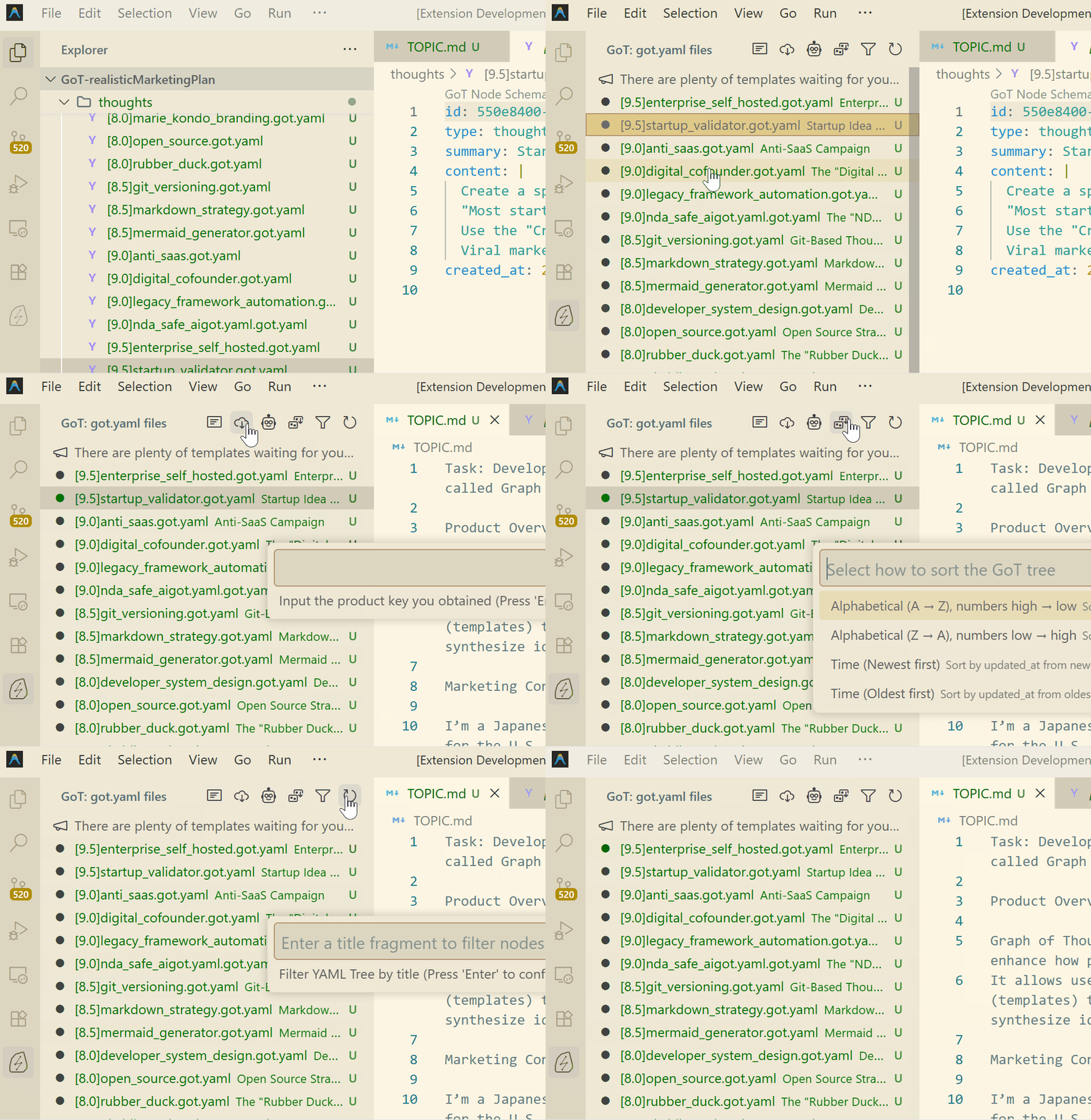
Visualize your .got.yaml files in a hierarchical tree view, showing relationships between thoughts and resources with clarity.
Access built-in templates for "Normal Graph of Thoughts", "Brainstorming", and "Critique" workflows to structure your ideation.
Support for downloading premium workflows using a product key to expand your capability set.
Automatic validation for GoT nodes (*.got.yaml) ensures data integrity. Easily copy relative paths for sharing context with LLMs.
Command Reference
Workflow & Setup
| Command / ID | Description |
|---|---|
|
Select a workflow
got-extension.openWorkflowSelection
|
Choose from built-in templates (Normal, Brainstorming, Critique) or your downloaded premium workflows to apply to your workspace. |
|
Download Workflow
got-extension.downloadWorkflow
|
Enter your product key to download and save premium workflows to your global storage for reuse. |
|
Open TOPIC.md
got-extension.openTopicFile
|
Quickly open or create the TOPIC.md file, which serves as the central theme or problem statement for your current session. |
Tree View Management
|
Filter
got-extension.filterYamlTree
|
Filter the tree view by title or ID fragment to find specific nodes quickly. |
|
Sort
got-extension.sortYamlTree
|
Sort the tree view by:
|
|
Reload got.yaml
got-extension.reloadYamlTree
|
Manually refresh the tree view if external changes haven't triggered an update. |
Node Operations
These commands are available via the context menu in the "GoT" view or the Command Palette.
|
Create a child node
got-extension.createYamlFile
|
Create a new thought node linked as a child to the selected node. |
|
Rename id
got-extension.renameYamlTitle
|
Update the id field within the YAML content of the selected node. |
|
Rename file name
got-extension.renameYamlFileName
|
Rename the physical file on disk. |
|
Reset Score to Zero
got-extension.resetScoreToZero
|
Quickly reset the score in a filename (e.g., changing [0.8]file.got.yaml to [0.0]file.got.yaml). |
|
Delete
got-extension.deleteYamlFile
|
Delete the selected GoT node file. |
Utilities
|
Convert to got.yaml
got-extension.convertToGotYaml
|
(Explorer Context Menu) detailed wrap any file's content into a new .got.yaml resource node. |
|
Clear & Copy Relative Path
got-extension.clearAndCopyRelativePath
|
Copy the relative path of the selected node to the clipboard (useful for pasting into LLM prompts). |
|
Append Relative Path
got-extension.appendRelativePath
|
Append the relative path of the selected node to the current clipboard content. |
Requirements
This extension automatically installs redhat.vscode-yaml to provide robust JSON Schema validation for your GoT files.